• Global CNC market projected to reach $128B by 2028 • New EU trade regulations for precision tooling components • Aerospace deman
NYSE: CNC +1.2%LME: STEEL -0.4%

Automated Lathe Bar Feeding Problems That Hurt Uptime
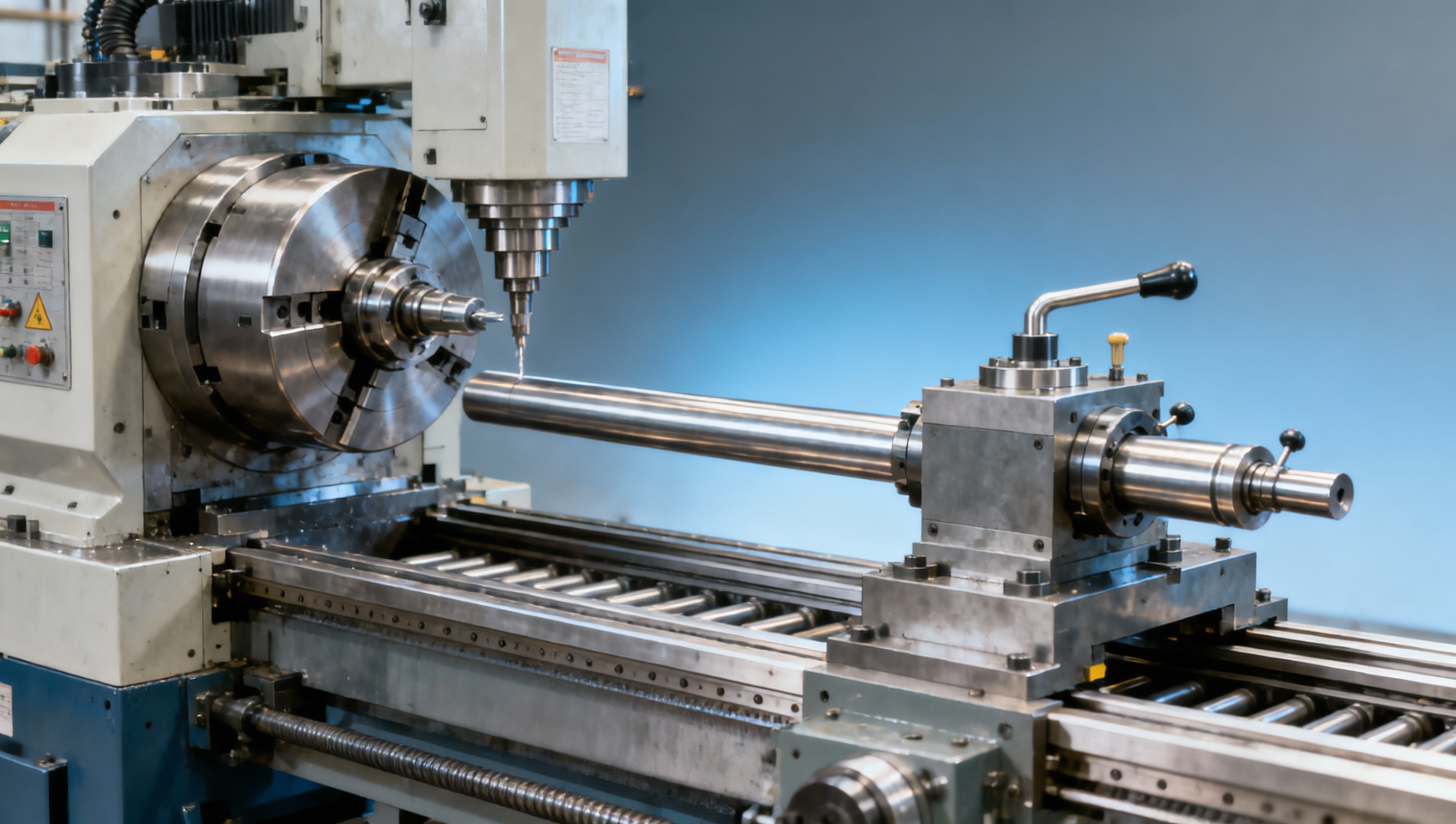
Automated lathe bar feeding problems can quietly disrupt uptime, reduce part accuracy, and increase waste across any CNC production environment. For manufacturers involved in metal machining, industrial CNC, and automated production lines, even small feeding issues can affect the entire production process. This article explores the most common causes, warning signs, and practical solutions to help operators, buyers, and decision-makers improve CNC metalworking reliability and output.
Why bar feeding problems matter more than many shops expect
In CNC turning, the bar feeder is not just an accessory. It is a production-critical system that determines how consistently raw stock enters the spindle, how long the machine can run unattended, and how stable each cycle remains over 8-hour, 12-hour, or even 24-hour shifts. When feeding becomes inconsistent, the result is rarely limited to one stopped machine. It can affect downstream inspection, rework capacity, labor scheduling, and delivery commitments.
For operators, the first pain point is usually interruption. A machine that should complete dozens or hundreds of parts per bar may stop early because of push rod drag, bar whip, misalignment, or sensor faults. For procurement teams, repeated feeding issues raise maintenance costs and make it hard to compare low-cost versus higher-spec automation. For decision-makers, poor uptime weakens OEE, increases scrap exposure, and complicates smart factory planning.
This issue is especially important in industries such as automotive components, aerospace fittings, energy parts, hydraulic shafts, and electronics hardware, where shaft-like or round stock is common. In these environments, even a small change in feeding stability can create measurable variation in concentricity, part length repeatability, or tool wear behavior within the first 20–50 cycles of a production run.
The root cause is often misunderstood. Many shops assume the CNC lathe itself is responsible for unstable output, when the real issue is the interaction between material straightness, bar feeder channel size, spindle liner condition, and setup discipline. Understanding these linked variables is the fastest way to reduce unplanned downtime and improve CNC production reliability.
Common business impacts of unstable bar feeding
- Lost spindle time due to repeated alarms, manual resets, and short-run interruptions during unattended operation.
- Part quality drift caused by inconsistent bar presentation, vibration, and changing cutting load near the spindle entrance.
- Higher labor involvement because operators must intervene every few cycles instead of monitoring multiple machines.
- More scrap and rework when bent, oily, undersized, or oversized stock is loaded without matching feeder setup.
What usually causes automated lathe bar feeding problems?
Most automated bar feeding problems come from a mismatch rather than a single failure. Material condition, feeder configuration, lathe interface, and maintenance condition all have to align. A feeder that runs well with 12 mm drawn bar may struggle with 25 mm rougher stock, shorter remnants, or material with greater residual curvature. Shops that process multiple diameters in the same week often face this challenge more than dedicated high-volume lines.
Material quality is one of the first factors to check. Straightness variation, inconsistent diameter tolerance, heavy surface oil, burrs on cut ends, and mixed bar lengths can all interrupt smooth loading. In practice, bar stock that seems acceptable for manual loading may still create feed hesitation in an automatic system, especially at higher spindle speeds or on long bar runs where whip control becomes more critical.
Mechanical causes are equally common. Worn guide channels, damaged spindle liners, loose support elements, weak clamping pressure, and poor pusher alignment can gradually reduce performance over weeks or months. Because these changes happen slowly, many shops normalize the symptoms until they reach a point where uptime drops sharply or part variation becomes visible in inspection records.
Control-related issues also matter. Incorrect setup parameters, delayed sensor response, poor synchronization between feeder and lathe, and inconsistent remnant handling can trigger false alarms or incomplete advance cycles. In automated production, even a 2–3 second delay per cycle becomes significant when multiplied across hundreds of cycles per day.
Main causes by category
The table below helps separate bar feeding problems into practical troubleshooting categories so operators and buyers can identify whether the issue is mainly material-driven, mechanical, or control-related.
This comparison shows why a quick repair is not always enough. If the material, feeder setup, and machine parameters do not match the actual production mix, the same problem often returns within 1–2 shifts. A structured diagnosis saves more time than repeated trial-and-error adjustments.
Three warning signs that should not be ignored
- Cycle time begins to vary by a few seconds even though the part program is unchanged.
- Operators hear more vibration or impact during bar rotation, especially on longer stock lengths.
- Short remnants, loading transitions, or bar changes create a disproportionate share of stoppages.
How operators can troubleshoot feeding faults before uptime drops further
When an automated lathe bar feeder starts creating downtime, the best response is a repeatable troubleshooting routine. Many shops waste hours adjusting speed or resetting alarms without checking the physical path of the bar. A better method is to review the system from stock loading to spindle entry, then compare actual behavior over 10–20 feed cycles rather than one isolated event.
Start with the bar itself. Confirm diameter range, visible straightness, end condition, and bar length consistency. Then inspect guide channels, liner clearance, and the pusher interface. If the system processes different materials such as carbon steel, stainless steel, brass, or aluminum in the same week, note whether the fault appears only on one material family. That pattern often indicates setup mismatch rather than a hardware defect.
Next, review feeder and machine synchronization. Check whether the sensor confirms full advance at the correct point, whether remnant logic is set properly, and whether the feeder acceleration profile is too aggressive for the stock length. In some applications, reducing the push aggressiveness and verifying support alignment can stabilize operation without reducing practical throughput.
Finally, document every intervention. If one machine experiences three similar alarms per shift while identical lathes do not, the comparison itself becomes useful evidence. For larger manufacturers running several automated turning cells, this kind of record can support maintenance planning, supplier discussions, and future bar feeder procurement decisions.
A practical 4-step inspection routine
- Step 1: Inspect incoming bars for length consistency, obvious bend, cut-end quality, and surface oil level before loading.
- Step 2: Check wear points including guide channels, spindle liner, pusher tip, and any rotating support contact surfaces.
- Step 3: Verify parameter settings such as feed distance, stop confirmation, remnant sequence, and acceleration or pressure values.
- Step 4: Run a monitored test over 10–20 cycles and compare cycle stability, alarm frequency, and part repeatability.
Typical symptom-to-action guide
If your team needs a faster response path, the table below connects common bar feeding symptoms with likely causes and first actions. It is useful for operators, maintenance staff, and production supervisors.
This kind of symptom table is valuable because it shortens response time. Instead of treating every bar feeder alarm as a unique problem, teams can classify faults and move from guesswork to a repeatable maintenance process within the same shift.
What should buyers and decision-makers evaluate before selecting or upgrading a bar feeder?
A bar feeder should be selected as part of the turning system, not in isolation. Procurement teams often focus on upfront cost, but the better evaluation is total operating fit across material range, diameter range, target shift pattern, staffing model, and unattended runtime expectations. A feeder that looks economical for one part family can become expensive if the shop runs frequent diameter changes or mixed batch sizes.
Start with production profile. Is the line built for long-run automotive parts, shorter aerospace batches, subcontract work with changing diameters, or mixed-material precision components? The answer affects whether you need faster changeover, broader compatibility, lower vibration behavior, or simpler maintenance access. For many B2B manufacturers, the most practical distinction is between dedicated volume production and flexible multi-part production.
Compatibility should be checked in at least 5 key areas: machine interface, spindle liner sizing, usable bar length, stock diameter range, and control communication. Lead time is another major factor. Depending on configuration complexity, installation planning, and local support availability, implementation can range from a few days for a straightforward retrofit to several weeks for a new automated cell integration.
Decision-makers should also ask how the supplier supports commissioning, operator training, spare parts access, and troubleshooting response. In global manufacturing environments, support capability often matters as much as machine specifications, especially where plants run multiple shifts and cannot afford waiting several days for setup clarification or component replacement guidance.
Key procurement criteria for CNC bar feeding systems
The following comparison helps procurement teams evaluate automated lathe bar feeder options using selection criteria that affect uptime, flexibility, and long-term cost rather than purchase price alone.
PREVIOUS ARTICLE
Recommended for You
 Global Manufacturing Lead Times Improve but Not EverywhereGlobal Machine Tool Trade Research Center
 Machine Tool Market Inventory Pressure Is Building AgainGlobal Machine Tool Trade Research Center
 Metal Lathe vs CNC Milling for Low Volume Round PartsCNC Machining Technology Center
 CNC Cutting Gas Choice Affects More Than Edge FinishCNC Machining Technology Center
 CNC Metalworking Shops Face New Pressure on TraceabilityManufacturing Policy Research Center
 Automated Lathe Cycle Time Gains Can Hide Quality LossesCNC Machining Technology Center

Aris Katos
Future of Carbide Coatings
15+ years in precision manufacturing systems. Specialized in high-speed milling and aerospace grade alloy processing.
▶
Metal Lathe Accuracy Drifts After Warm Up for a ReasonMachine Tool Industry Editorial Team▶
Automated Lathe Bar Feeding Problems That Hurt UptimeMachine Tool Industry Editorial Team▶
A metal lathe can lose accuracy long before it failsMachine Tool Industry Editorial Team▶
Where vertical lathe performance falls short in real productionMachine Tool Industry Editorial Team▶
Automated lathe errors that often start with bar feedingMachine Tool Industry Editorial Team
Mastering 5-Axis Workholding Strategies
Join our technical panel on Nov 15th to learn about reducing vibrations in thin-wall components.

Providing you with integrated sanding solutions
Before-sales and after-sales services
Comprehensive technical support